Homestead

Free desktop GIS software built around one map. Open any vector or raster data, from disk or over the internet, style it, colour it by a field, cut it down to a shape, and export MBTiles, a Cloud Optimized GeoTIFF or a GeoPackage. Save the whole desk as a project file. GDAL travels inside the package, so there is nothing to install, no account to make, and nothing that leaves your machine. And when a Tavak survey comes back from the field, this is the desk it lands on.

Freeware · Linux, Windows, macOS · No account, no telemetry under heavy development
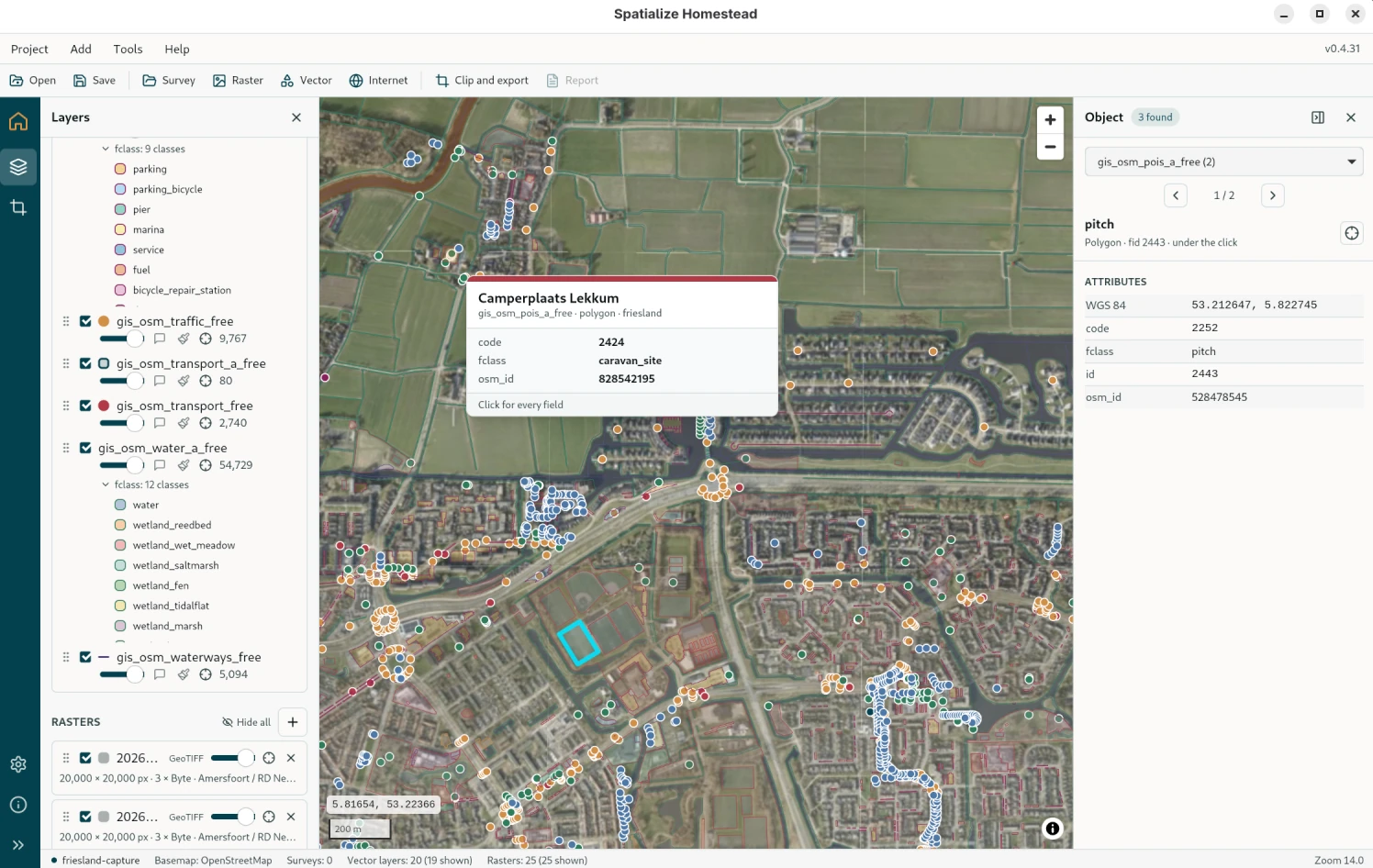
Homestead with vector layers and an orthophoto on the map, the layer tree with a thematic legend beside it
Vector layers and an orthophoto on the map, the layer tree with a thematic legend beside it.

One map, the whole desk

A homestead is where you get ready to go out, and where you carry the work back to. Here the map is the workplace: everything you open lands on it, and everything you do happens on top of it. No GIS suite to install first, no server, no account. Just a free tool for anybody with spatial data on a computer.

🗺️

Any vector data

Shapefile and its zip, GeoJSON, KML, KMZ, GPX, CSV, GeoPackage, File Geodatabase, from disk or fetched by URL: a Geofabrik extract, say. Millions of features pan smoothly. Tiles are cut on demand from the file's own spatial index, simplified for the zoom you are at, thinned out where a city gets too dense, and kept on disk once you have seen them.

🎨

Style and colour

Outline, fill, width and opacity per layer, and points drawn either as circles or as glyphs from five bundled icon fonts. Colour by a field (unique values, equal intervals or quantiles) using any of thirty palettes. Every class stays editable, and the legend sits under the layer.

🖼️

Rasters at every zoom

GeoTIFF, JPEG 2000, MBTiles, or a drone orthophoto with no overviews at all. A pyramid is built once in the background, after which the raster draws at every zoom. Separate pieces of an orthophoto mosaic into one, still in their own coordinate system.

✂️

Clip and export

Draw a shape, or take the polygons from a file, and cut whatever is on the map down to it: MBTiles (WebP by default, PNG when it has to be lossless), a Cloud Optimized GeoTIFF, or the visible vector layers gathered into one GeoPackage. It puts every core to work, so a 5 × 5 km block of 5 cm orthophotos becomes tiles in about two minutes.

🔍

Look things up

Click an object and you get everything under the click, from every visible layer, the innermost first, highlighted on the map as you go down the list. There are hover tips per layer, attributes as a table, and full-text search across every layer, which flies the map to whatever you pick.

📁

Projects

Save the desk as a .hstd file: what is open, how every layer is drawn, its styles and colours, the basemap, and where the map is looking. Double-click it to pick up where you left off. Paths stay relative, so the whole project folder can be moved.

🔒

Standalone and private

GDAL, PROJ and GEOS travel inside the package. Nothing to install first, no account, no telemetry. Your own files are never modified, and nothing leaves your machine.

🏠

Free, and staying that way

Homestead is free for anybody on Linux, Windows and macOS, with nothing held back behind a paywall. The same people build Tavak, but you do not need Tavak for Homestead to be worth having.
The desktop companion for Tavak

Homestead is also where a Tavak survey is got ready, and where it comes home to. None of this is required to use Tavak. It just makes the day easier, and the survey's own GeoPackage is never touched.

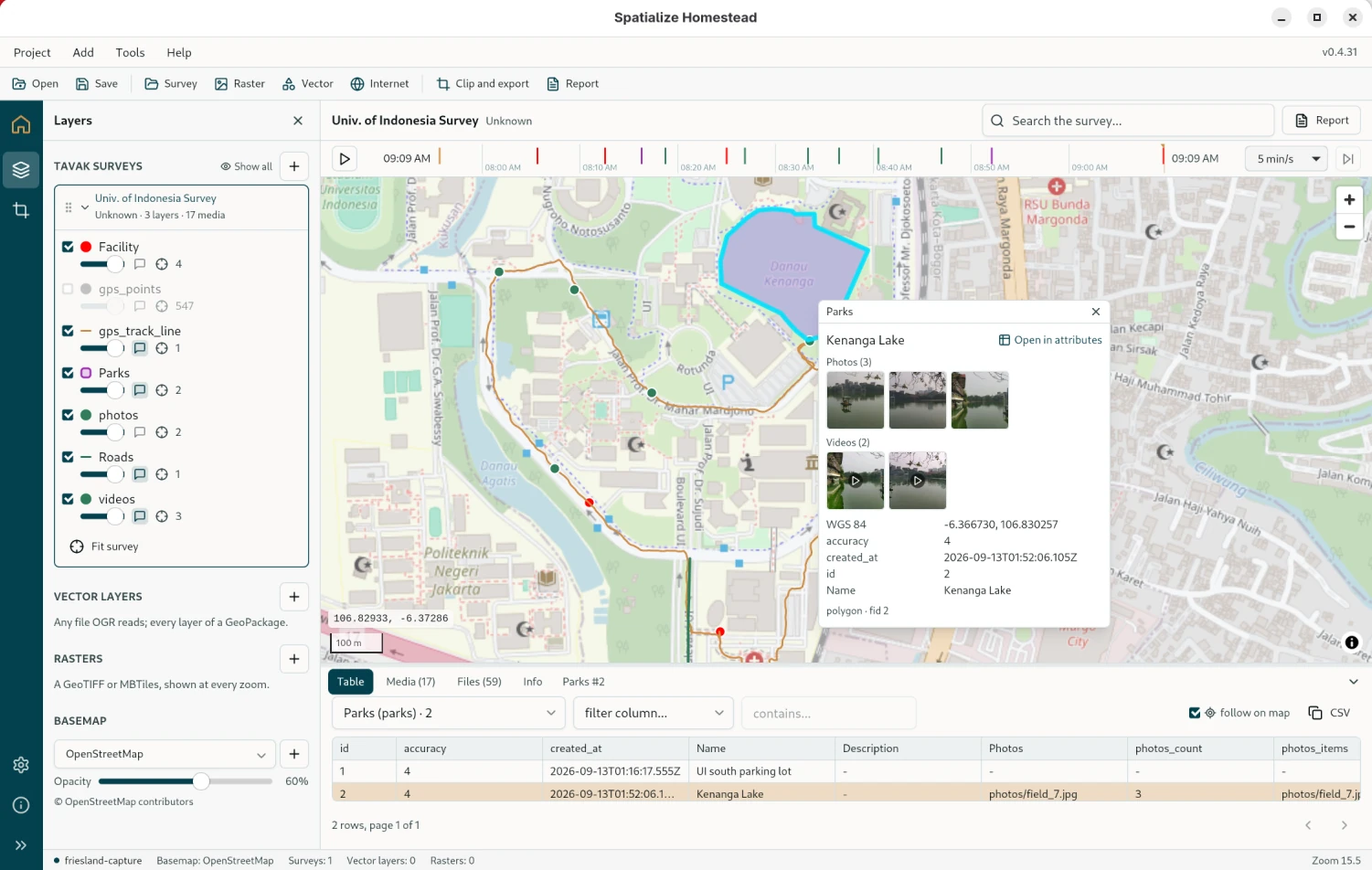
Homestead with a survey open: the Media tab under the map with every photo and video of the survey, the replay ribbon over the map, the layer tree beside it
A survey open on the map: the replay timeline above, the table below, a park identified with its photo and video.
📦

Open the survey backup

Drop in the ZIP the phone exported. Layers, GPS track, photos, videos and forms come up on the map straight out of the GeoPackage inside it, in the coordinate system it was exported in. You can have several backups open at once.

▶️

Replay the day

A timeline above the map plays the survey back in the order it was captured: what was recorded, when, into which layer, with the photo and video taken at that spot.

📷

Photos, videos, forms

Every media field of every object, as thumbnails and at full size. The forms come through as attributes, searchable like everything else on the map.

📄

Report as a PDF

The whole survey as a document: a summary, then one table per layer in capture order, with each row's photos and videos beside it. Ready to hand over.

Before and after the field

Before the survey: turn the orthophoto or the scanned map into an MBTiles basemap, cut the reference layers down to the area you are working in, and copy both to the phone. Tavak uses them with no signal.

After the survey: export a backup from Tavak, open it in Homestead, replay the day, check the photos and forms on the map, then hand over the PDF. Or take the GeoPackage on into QGIS.

Download

Homestead 0.5.x is under heavy development. It is free, needs nothing else installed alongside it, and never modifies your files.

Linux

AppImage, x86_64. Ubuntu 22.04 or newer, Debian 12, Fedora 36, or any distribution with WebKitGTK 4.1. Make it executable and run it. There is no installer.

↓  Download for Linux

Homestead_0.5.5_amd64.AppImage

  • About 140 MB; GDAL, PROJ and GEOS inside.

Windows

Installer, x64, Windows 10 and 11. The installer associates .hstd project files with Homestead.

↓  Download for Windows

Homestead_0.5.5_x64-setup.exe

  • About 60 MB. It is unsigned, so Windows will ask twice before it runs.

macOS

Disk image for Apple Silicon only: a Mac with an M1 or newer, any variant, running macOS 11 Big Sur or later. Open the image and drag Homestead into Applications.

↓  Download for macOS

Homestead_0.5.5_aarch64.dmg

  • About 20 MB. Signed and notarised by Apple, so there is no security warning.

SHA-256 checksums for all three files: SHA256SUMS.

New here? The documentation starts with installing and the first layer on the map. Found something broken? Expected, at this stage. Write to support@spatialize.dev and say what you did and what happened. A screenshot helps.

What works today

Everything below is in 0.5.x. What is not here is not there yet.

What is inside

The main pieces Homestead is built from. All of them are open source under a permissive licence, and the exact versions in this build are listed on the app's About page.