GPS Tracking
Satellite status, recording a track in the background, the accuracy gate, and averaging a GPS point.
Satellite status
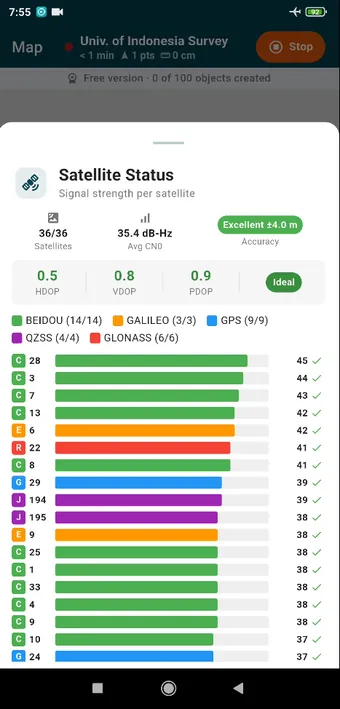
Open it by long-pressing the accuracy chip in the GPS bar. A green bar is a strong signal, and a tick means the satellite is being used in the fix. Indoors or under a roof the list comes up empty and the fix is whatever the last outdoor position was, so walk outside before you trust the chip.
Tracking modes
| Mode | Reads | A point every | Battery, roughly |
|---|---|---|---|
| High Precision | the raw GPS receiver | 1 m | ~15 % an hour |
| Balanced (default) | the fused provider | 5 m | ~8 % an hour |
| Battery Saver | the fused provider | 10 m | ~5 % an hour |
Set in Settings › GPS. The mode decides which receiver is read and how far you have to move before a point is kept. It does not decide how accurate a point is; that is down to the sky and the receiver, and the chip shows you what they managed. The fused provider blends GPS with Wi-Fi and cell for a faster first fix. High Precision reads the raw receiver instead, which is the only way past the 10 m or so that fused positions tend to settle at. The mode applies to the track; placing a point always uses the best fix going at that moment.
Some phones will not give the fused provider to an app in the background. When that happens the track is recorded from the raw GPS receiver instead and you will not notice the difference. The Map page says Not recording only when neither one can be read.
Recording the track
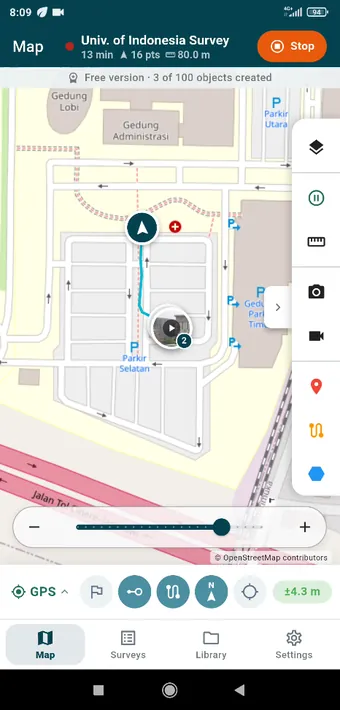
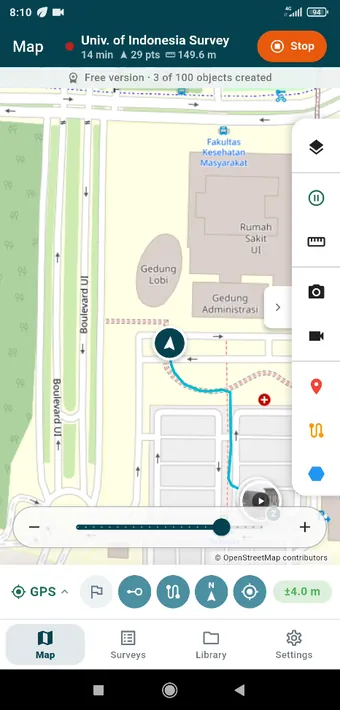
The track records in the background for as long as the survey is running: screen off, phone in a pocket, another app in front. A notification stays up the whole time. Stopping the survey stops the track, and resuming it carries on with the same one.
The accuracy gate
The chip in the GPS bar shows the reported accuracy, and its colour tells you whether to wait: green is good, amber will do, red means hold on. Every photo, video and point carries the accuracy it was captured with, and the export keeps it in the accuracy column.
GPS averaging
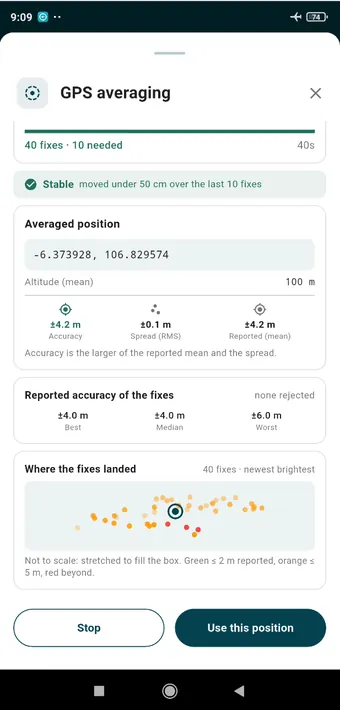
For a corner that has to be right, tap the GPS average tool while placing a point. The app gathers fixes as you stand still, throws out the worst of them, and reports the averaged position, its spread (RMS) and the reported accuracy as separate figures. Use this position puts the point at the mean.