Free Version & Subscription
Tavak is free to install and free to use. A subscription lifts two limits, and everything else is in the free version already.
What the free version includes
| Free version | Full version |
|---|---|
| One survey session | Unlimited sessions |
| 100 objects: points, lines, polygons, and photos or videos that stand on their own | Unlimited objects |
| Included in both: GeoPackage export and the QGIS project, survey forms, reference layers, online and offline basemaps, georeferenced images, geofences, landmarks, destinations. | |
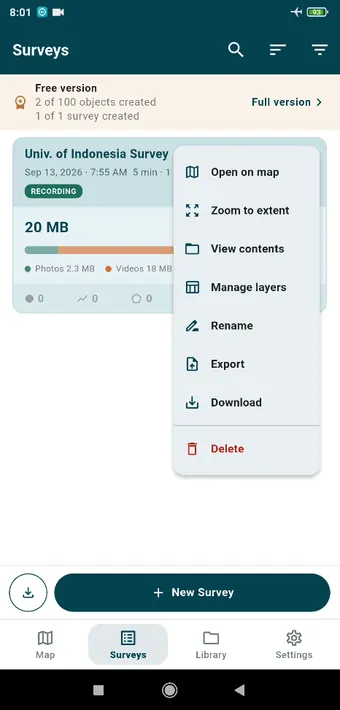
There is one rule. Sessions and objects are counted when they are created on the device, and deleting them does not hand the slot back. The free version is an allowance for one real job: collect it, export it, open it in QGIS. It is not a quota that refills. Importing a survey bundle uses up your one session, and the objects inside it count towards the 100. A bundle with more than 100 objects still imports in full, with nothing cut out, and you can look at it, edit it and export it. You simply cannot capture anything new until you subscribe. A photo or video taken into a feature’s form field belongs to that feature and is not counted.
You can always see where you stand. The Map tab shows Free version · 37 of 100 objects created under its title bar, and the Surveys tab and Settings › Full Version show both the objects and the session. When you hit a limit, whatever you were doing opens the Full Version screen and tells you which limit it was.
Plans
| Plan | Price |
|---|---|
| Yearly | USD 59.99 per year (shown in your local currency on Google Play) |
| Monthly | USD 6.99 per month |
Subscribe from the Full Version screen, and Google Play handles the payment. Both limits go straight away. There is no separate trial, because the free version is the trial, and it runs at your pace rather than a clock’s.
Managing the subscription
Change plan, cancel, or check the next billing date in Google Play › Payments & subscriptions › Subscriptions. Settings › Full Version in the app shows your status, and Restore purchases is there for a new phone signed in to the same Google account.
Working offline
The app checks your subscription with Google Play whenever it can reach it. With no connection it carries on for up to 7 days on the last answer it got, which covers an ordinary field trip.
After the subscription ends
Nothing gets locked. Your surveys, photos and exports stay on the device and stay readable, and the app goes back to the free version. The counters cover everything ever created on the device, so if you are past one session or 100 objects you cannot create more until you subscribe again. You can still export, import, and use every other part of the app.